Status
This is an experiment. Polyglot was built in an evening, with help from an AI coding assistant, to solve one family's movie nights. It has been tested on one Mac, with its built-in speakers, a USB-C monitor and Bluetooth headphones. It works for us, but expect rough edges. It's shared as is, with no support: issues may go unanswered, and forks are welcome.
How it works
Open a movie
Any video with more than one audio track: MP4, MOV, or MKV. Drop it on the window or press ⌘O.
Pick a device per language
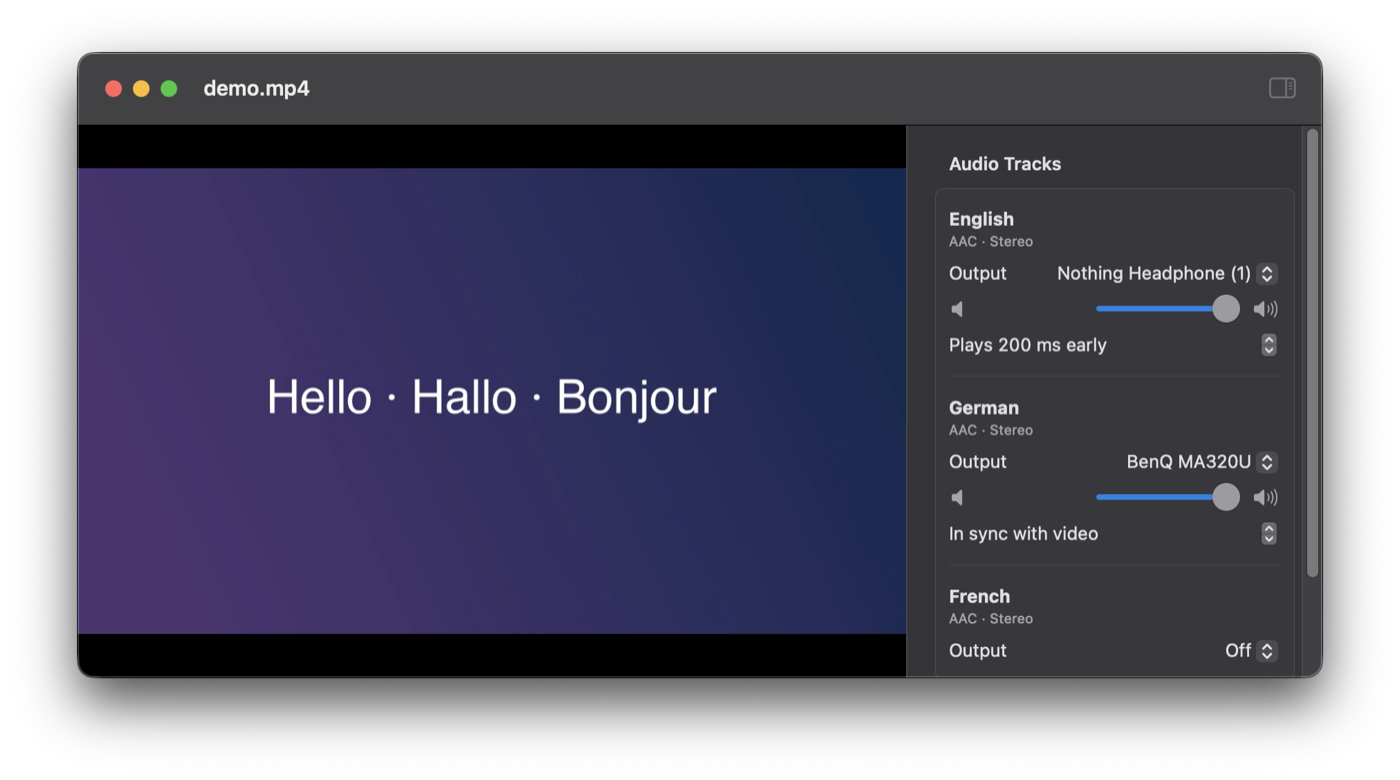
German to the TV, English to your AirPods, French off. Every connected output is listed.
Watch together
Pause, seek and resume as usual. Every track follows the picture, and Polyglot remembers your choices.
Features
- Two, three or more audio tracks at the same time, each on a different output device
- Works with any output macOS lists (tested so far: built-in speakers, a USB-C monitor and Bluetooth headphones)
- One video, one timeline: pause, seek and playback speed apply to every track
- Latency compensation per device, so Bluetooth headphones stay in sync with the lips on screen
- Volume per track, plus a master volume
- Remembers which language goes to which device
- Opens MKV files with a quick automatic conversion (the video is copied, not re-encoded)
- Native Mac app built on Apple's AVFoundation
Questions
Can I play two audio tracks of a movie at the same time on different speakers?
Yes, that's exactly what Polyglot does. Each audio track gets its own output device, so one language plays on the TV or speakers while another plays in headphones, at the same time and in sync with the video.
How do I listen to the original language in headphones while everyone else hears the dub?
Open the movie in Polyglot, set the dubbed track to your TV or speakers and the original-language track to your headphones. If your headphones are Bluetooth, nudge the latency setting until voices match the lips on screen. Polyglot remembers it for next time.
Does it work with AirPods and other Bluetooth headphones?
It should with any Bluetooth headphones macOS can play to (tested so far with one pair). Bluetooth adds roughly 150–250 ms of delay, so Polyglot plays Bluetooth devices 200 ms early by default, and you can fine-tune it per device.
Can't VLC, QuickTime or IINA do this?
No. They play one audio track at a time, to one device. The usual workaround, two VLC windows, drifts apart and doesn't pause or seek together. A macOS Aggregate Device keeps sync, but needs a specially prepared file and manual setup.
Which files does it play?
Local MP4 and MOV files with H.264 or HEVC video play directly. MKV files are converted automatically when you open them, which needs ffmpeg (brew install ffmpeg) and takes seconds. Polyglot is meant for videos you own or have the rights to watch.
macOS says it can't verify the app. What do I do?
Polyglot isn't notarized by Apple yet. Open it once, then go to System Settings → Privacy & Security and click "Open Anyway". Or run xattr -dr com.apple.quarantine /Applications/Polyglot.app in Terminal.
Is there a Windows, Linux, iPhone or Apple TV version?
iPhone, iPad and Apple TV can't do it: they only allow one audio output at a time. Windows and Linux can, and a guide for building those versions is waiting for contributors.